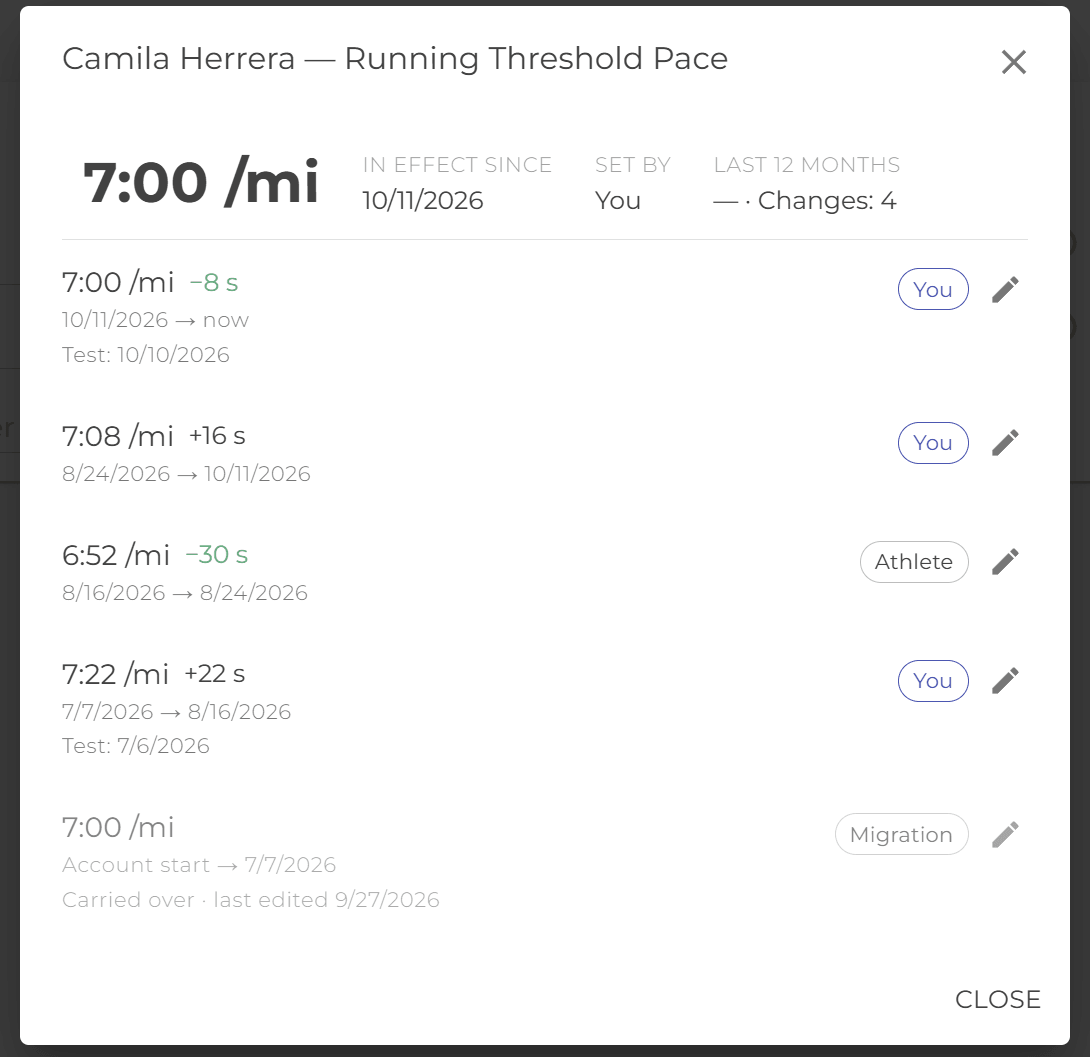
A history for every benchmark
On the Benchmarks page, each field now has a small history icon beside it. Tap it to see that benchmark’s story: the current value, when it took effect, who set it, and how far it has moved in the last 12 months.
Below that is every value it has had, newest first, with the change from the one before. Pace changes show in seconds per km or mile, and faster reads as an improvement. A period when nothing was set appears as Team average, because that’s what Smagpie used for those weeks.
Fix a typo, keep the history honest
Typed an FTP of 28 instead of 280? Tap the pencil on that row and correct the value. The date stays the same, so the correction doesn’t look like a new test. Corrections are recorded, so a coach can always see what changed.
Changes on the Fitness chart
On the athlete dashboard, the Fitness / Fatigue / Form chart now marks each day a threshold pace, FTP or heart-rate benchmark changed with an amber icon. Hover that day to see the old and new value and who set it, in your team’s units.
If some of the load in the range was estimated from your team’s average because no benchmark was set, a caption under the chart says which sports. Links under the chart take you straight to the history behind each change.
Load scored with the benchmarks of the day
Synced and uploaded activities are now scored with the benchmarks the athlete had on the day of the workout, not today’s. Raise an FTP on Friday and a ride from Tuesday that syncs on Saturday is still scored with Tuesday’s FTP.
For coaches on Coach Hub
In an athlete’s benchmarks popup on Coach Hub, tap a row to open that benchmark’s history (read-only there). The age shown beside each value now counts from the day it took effect.
Polish
- No more needless re-sends. Saving the Benchmarks page without changing anything no longer re-sends workouts to Garmin, Coros or Intervals.icu.
- Benchmarks in your data export. The athlete data export now includes a
benchmarks.csvwith the full history. - A clearer rest marker. Rests on workout charts show a grey pause icon instead of 💤.
- One-time reset. Coach Hub’s benchmark column goes back to its first option once. Pick yours again and it sticks.
Is a benchmark history telling you something unexpected? Tell us in Discord.